Four real car and life insurance ads seen running on Meta in November 2026, with why each works, Meta's rules for insurance ads and cost per qualified lead.
An effective insurance ad on Meta has four parts: a hook that names the buyer's problem, an offer with a number in it, a reason to trust the brand, and one button that starts a quote. Because insurance sits under Meta's financial products rules, it also has to meet targeting, verification and special ad category requirements before it can run.
Below are 4 real insurance ads seen running on Meta on November 11, 2026: three for car insurance (Lemonade, LendingTree, NerdWallet) and one for life insurance (Thrivent). After them come Meta's rules and a simple way to judge an insurance campaign: cost per qualified lead.
See what makes winning ads win and when a creative starts to tire.
What an effective insurance Meta ad needs
- Hook. A line about the buyer's real worry: paying too much, being judged on age, protecting family.
- Offer. A price or a comparison (from $30 a month, $39 against $189) or a clear rule (rates based on driving, not age).
- Proof. A brand name, a track record (since 1902) or real figures on the image.
- Button. Three of the 4 use Get quote. The fourth, Thrivent's video, shows no button in the captured frame.
| Ad | Product | Format | Hook | Offer |
|---|---|---|---|---|
| Lemonade | Car insurance | Image | "Stay forever young" | Rates based on driving, not age |
| LendingTree | Car insurance comparison | Image | "Rev Up Your Savings!" | From $39 a month (old rate $189) |
| NerdWallet | Car insurance comparison | Image | "Are you paying too much?" | From $30 a month |
| Thrivent | Life insurance | Video | "For more than 100 years" | Brand story, no offer |
Auto insurance ad examples
Lemonade: a blunt line on a stop sign

The first line reads: "Stay forever young. We only judge your driving, not your birth year." The headline is "Lemonade Car Insurance", and the button is Get quote.
Why it works: a stop sign stops the scroll, and the line plays on how people feel about car insurance pricing. The offer (rates based on driving, not age) is the whole message.
What to copy: turn your one differentiator into a sentence a driver would repeat, and pair it with a visual that has nothing to do with the usual car shot.
Lemonade's ads in the Meta Ad Library
LendingTree: old rate against new rate
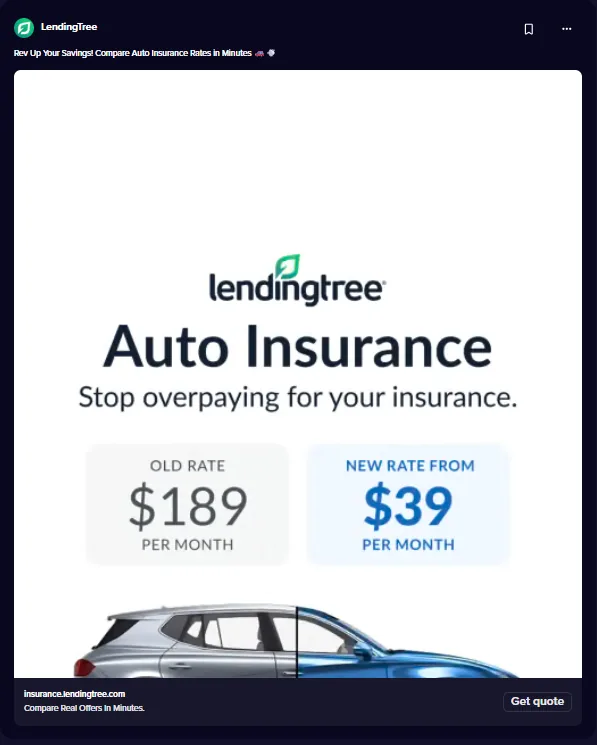
The first line reads: "Rev Up Your Savings! Compare Auto Insurance Rates in Minutes" The image shows a new rate from $39 per month against an old rate of $189, and the button is Get quote.
Why it works: the old rate and the new rate side by side make the saving clear at a glance, and "in minutes" tells the viewer the effort is small.
What to copy: show a before and after number in the image, and say how long the next step takes. Use real figures and label them as examples of a rate, not a promise for everyone.
See LendingTree's insurance ads on Meta
NerdWallet: start the quote inside the ad
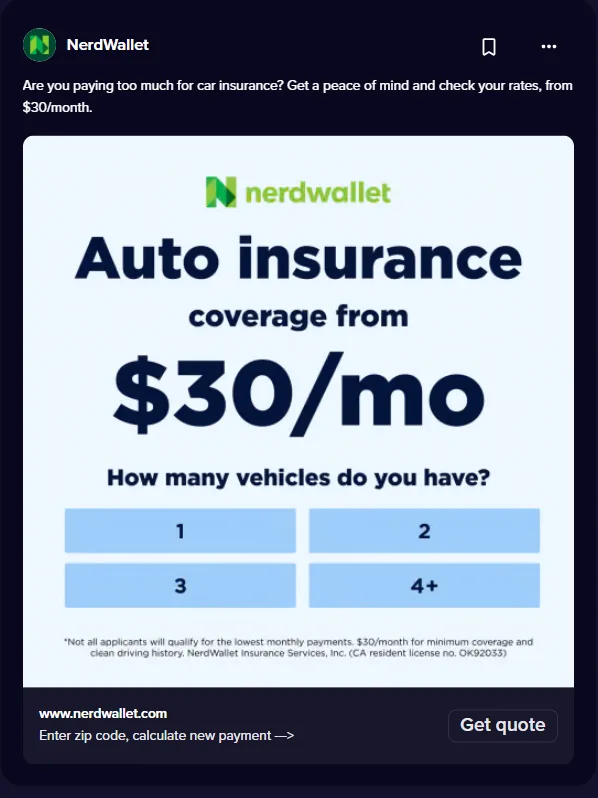
The first line reads: "Are you paying too much for car insurance? Get a peace of mind and check your rates, from $30/month." The button is Get quote.
Why it works: the first question of the quote (how many vehicles) is built into the image, so the click feels like step two, not step one. The line opens with a question the viewer already asks.
What to copy: if your lead form or quote page starts with a simple question, preview that question in the creative. Keep it to a question that needs no sensitive detail.
Life insurance ad example
Thrivent: an origin story for a long-term product

The first line reads: "For more than 100 years, we've been helping people protect what matters most. Thrivent's founding members started our very first life insurance fund in 1902."
Why it works: old photos and a short origin story build trust for a product people buy once and keep for decades. It makes no offer, which suits a brand ad that isn't asking for a quote yet.
What to copy: for life and other long-term products, lead with how long you've been doing it and who you do it for, then retarget interested viewers with an offer.
Meta's rules for insurance ads
This summarizes Meta's published rules and is not legal advice. Check your ads with whoever handles compliance for your business.
- Special ad category. Meta's special ad categories page lists insurance products among the "Financial products and services" ads. Since January 21, 2025, the category is required for campaigns from advertisers based in the United States or showing ads to audiences in the United States, and ads may be rejected without it.
- Age. Under Meta's financial and insurance products policy, ads promoting credit cards, loans or insurance must be targeted to people aged 18 or older.
- No direct requests for personal information. Ads can't directly request personally identifiable information or certain types of financial information.
- Verification and licensing. Advertisers must verify their business or individual identity, and may need to be licensed in the country they target. Insurance products are among those that may require a license, and advertisers must follow all applicable laws, including licensing and disclosure requirements.
- Brand ads. The policy page lists brand ads for banks or insurance companies as running without the usual authorization or restrictions.
Lead form or landing page for insurance leads
Meta's lead ads guide describes three types: lead ads with calling, with an instant form, and ads that click to message. Instant forms can include custom questions to help qualify leads, and leads can be downloaded from Ads Manager or Leads Center, or connected to a CRM system.
For financial products targeted to the US or Canada, the same page says you may not collect certain information in a lead ad, including age, gender, marital or relationship status and location details such as street address, city or zip code. A quote flow on your own landing page is where those details go, so many insurers use the ad to earn the click and the page to price the policy.
- Instant form: fewer steps and quick to start; keep questions to ones that tell you whether the lead is real, such as the type of cover.
- Landing page: room to explain the cover and the price; make the first question the one your ad already previewed.
Testing by cost per qualified lead
A cheap lead that never answers the phone costs more than it looks. Define a qualified lead first (for example, a lead who answered the call or completed the quote) and judge each ad on cost per qualified lead, not cost per lead.
Illustrative numbers: an ad spends $600 and brings 40 leads, 12 of them qualified. That is $15 per lead but $50 per qualified lead. A second ad with $20 per lead but 50% qualified costs $40 per qualified lead, so it wins. Our guide to Meta ads automated rules shows how rules can pause ads when a cost passes a limit you set.
Find what makes insurance ads win with Madgicx
Creative Insights breaks down every creative, including video, to show what makes winning ads win, and flags creative fatigue so you know when an angle needs refreshing. The AI Ad Generator makes new image ads from a prompt, an image or any ad in the Meta Ad Library, ready to edit before you use them.
Try Madgicx free for 7 days and test your next insurance angle
FAQ
What should an insurance ad include?
A hook about the buyer's worry, an offer with a number or a clear rule, a reason to trust the brand, and one button such as Get quote. Don't ask for personal or financial details in the ad itself.
Do insurance ads need a special ad category on Meta?
Yes, in the United States. Meta lists insurance products under "Financial products and services", which has been required since January 21, 2025 for US advertisers and US audiences.
What age can insurance ads target?
Ads promoting insurance must be targeted to people aged 18 or older.
Can I collect age or zip code in an insurance lead ad?
For financial products targeted to the US or Canada, Meta says you may not collect certain information in lead ads, including age, gender, marital status and location such as zip code. Use your landing page for those details.
How do I judge insurance ads?
Use cost per qualified lead: spend divided by the leads that passed your own qualification, such as completing a quote. It shows which ad brings leads worth calling.